New Requirements for E-Invoicing in France
That way, our customers didn't have to use an extra system


That way, our customers didn't have to use an extra system
On September 1, 2026, new rules for electronic invoicing were introduced in France. For many companies, this raised one and the same question:
How can we ensure that we comply with the new reporting requirements without it becoming yet another manual task for the finance department?
We already had the answer ready for our customers—built right into Conrab Opto.
The new rules pertain to the receipt of supplier invoices. Affected companies must be able to receive e-invoices through an approved service provider and report the financial transactions to the French authorities.
What is easy to overlook is that the requirement does not end with the approval and payment of the invoice. If you choose not to pay an invoice—for example, because it is incorrect or has already been credited—that must also be actively reported. Therefore, doing nothing is not a neutral choice under these regulations; it is, in itself, a violation of the reporting obligation.
It is this difference that makes the requirement harder to comply with in practice than it sounds in theory.
Reporting a paid invoice is a natural step in the daily workflow—the invoice is approved, paid, and the reporting essentially takes care of itself through the systems you already use.
Actively taking the initiative to report that an invoice should not be paid is a different kind of step. It requires someone to pause, remember that this extra step exists, and perform it separately from the usual workflow. If this step isn’t built into the daily routine, there’s a high risk that it will be overlooked, especially when dealing with large volumes of invoices.
And for finance departments that handle hundreds of invoices a week, “it’s easy to forget” isn’t just a theoretical risk—it’s a matter of when, not if, it will happen.
Our customers already had an e-invoicing provider in place to meet French requirements for the most part. While the provider does offer the option to mark an invoice as rejected, this is done through a completely separate interface, on a different website than the one the customer normally uses.
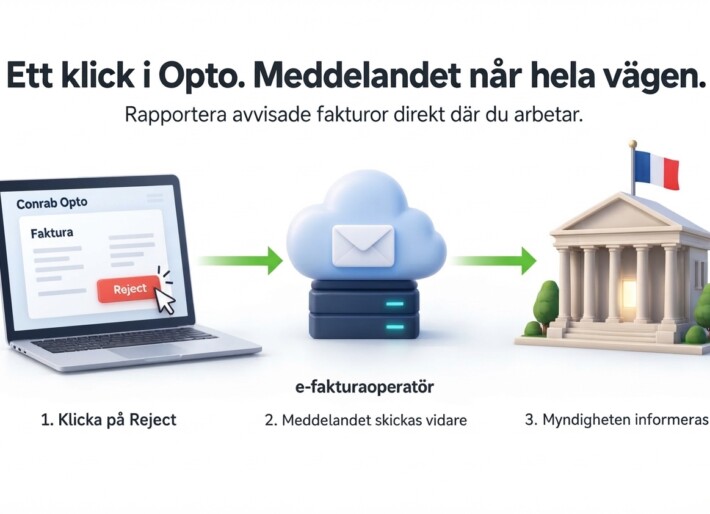
We decided to build the feature directly into Conrab Opto instead. The user clicks “reject” in the same view where the invoice is already being reviewed. Conrab Opto then forwards the information to the customer’s e-invoice provider, which in turn is responsible for reporting it to the French authorities.
From the user's perspective, there's no difference from handling any other invoice. One click, and it's done.

Imagine an accounting assistant who processes hundreds of invoices each week. One of them is not to be paid. If that person then has to remember to open another website, log in there, and make the same assessment all over again, the risk is obvious—either that step is forgotten entirely, or it takes an unnecessarily long time and creates a bottleneck in the workflow.
We are not replacing the e-invoice provider—they continue to perform their duties for the French authorities just as they did before. What we are building is a bridge between the day-to-day workflow at Conrab Opto and that system, so that users never have to handle reporting manually in a separate interface.
This is not only relevant for companies operating in France. Several other countries are introducing similar requirements for reporting financial transactions—or equivalent requirements when an invoice is not to be paid in different phases and with different details—but based on the same fundamental principle.
The principle behind the solution—eliminating the need for unnecessary system changes when new regulatory requirements are introduced—is therefore relevant to more of our customers, regardless of the country. If you operate in multiple countries, there is a high probability that you will encounter the same type of requirements again, just in a different form.
The feature is built as part of the platform, not as a one-time solution for a single customer. This means we can now offer the same functionality to more customers who handle invoicing in France, without having to rebuild it from scratch every time a new company has the same requirements.
That’s our philosophy through and through: when a regulatory requirement changes, we don’t just want to address it for one customer at a time. We want to build a solution that will stand the test of time when the next customer—or the next country—imposes the same type of requirement.
The biggest compliance risks rarely lie in the major, obvious requirements—but rather in the small, easily overlooked steps that require someone to actively go the extra mile. By building the rejection feature directly into Conrab Opto, we have solved an urgent problem for our customers, while also creating a solution that can be scaled to serve more customers and comply with the regulations of more countries.
Affected companies must be able to receive e-invoices through an approved operator (PA) and report financial transactions to the French authorities, including cases where an invoice is not to be paid.
Yes. The rules require active reporting even when a received invoice is rejected or not paid, not just upon approval and payment.
Yes, with the right integration. At Conrab Opto, we've built the rejection feature directly into the standard workflow, so users don't have to log in separately with the e-invoice provider.
Several countries are introducing or planning similar requirements for e-invoicing and transaction reporting. The principle of active reporting—even for rejected invoices—is becoming increasingly common within the EU.
Please get in touch with us, and we'll tell you more about how we can help you.
Conrabs' case management system adapts to your workflows—whether you're handling 5 or 50 different types of cases.
Want to know more?
Here's how to get the whole process under control
The invoice came in. Someone needs to look at it. It gets forwarded. A reminder is sent. The late fee comes in. And no one really knows where the invoice is right now.
Does that sound familiar? It does to most finance departments. And that’s exactly what a good approval workflow solves.
This article covers everything you need to know about invoice approval—from the basics to digital workflows, AI support, and how to choose the right system. Concrete and to the point.
Approving an invoice means formally authorizing it for payment. In everyday language, “approve” and “authorize an invoice” are used interchangeably—they mean the same thing.
In practice, the invoice approval process consists of twoseparate checks, not just one.
Goods Receipt/First Signatory is issued by the person who ordered the goods or services. That person confirms that the delivery is correct, that the quality is right, and that the amount matches what was agreed upon. Simply put: did we get what we ordered?
Financial approval —also known as final approval—is issued by the finance manager or supervisor. It confirms that the expense is covered by the budget, that the accounting entry is correct, and that the invoice is ready for payment. The questions it answers: Should we pay, and how should it be recorded in the books?
Together, they form the dual-control principle / four-eyes principle —ensuring that at least two people are involved in every approval. This is the foundation of secure invoice processing and ensures that no single mistake or instance of fraud slips through unnoticed.
Using your email inbox as an approval tool feels safe. But it costs more than you think.
A vendor invoice goes through a process from the inbox to being paid and posted. Here’s what that process looks like:
In a manual workflow, steps 3 and 4 are the ones that take time. The invoice sits there waiting. The reminder gets forgotten. And every day that passes brings us one day closer to the due date.
In a manual workflow, someone reads the invoice, transcribes the information by hand, and determines who needs to approve it. In a digital workflow, the system handles that for you.

Manual registration and data entry
Chasing signatories
Binders, printouts, and file cabinets
Uncertainty about who approved what and when
Automatic processing of the invoice upon receipt
Direct allocation to the appropriate approver based on amount, supplier, or cost center
Automatic reminders – the system keeps track, not you
Searchable digital archive with full traceability
Audit trail: every step is logged; nothing is deleted
One thing that’s often overlooked: the paper disappears. No printouts, no filing cabinets, no piles of invoices on the desk. You can see the difference both in your daily routine and in your environmental report.
Peppol is an international network for structured e-invoicing. The supplier sends the invoice via Peppol, and it arrives directly in your system—machine-readable and structured. No manual entry. No guessing about the format.
An automated approval workflow means that AI handles the repetitive decisions—so you can focus on what actually requires a human decision.

Suggests account assignment based on historical data
Same supplier, same account as last time. The proposal will be ready when you open the invoice
Flags discrepancies with purchase orders and contracts
Is the amount incorrect? You'll see it right away
Automatically matches against the supplier registry
Do the business ID and bank details match what you have on file?
Allocate benefits to the appropriate authorizer based on your authorization policy
An approval policy is a set of rules that defines the amounts and cost centers each person is authorized to approve. Without it, a junior employee could approve a million-dollar invoice—or everything could get stuck with the CEO. Both scenarios are undesirable.
A good approval process is embedded in the system. Not in a Word document from 2019—and certainly not just in one person’s head.
Digital invoice approval won’t be fully effective if the data doesn’t end up in the right place in the financial system. In that case, you’ve simply shifted the manual work to another step.
With a good integration, journal entries, approval decisions, and invoice data are automatically transferred to the general ledger. The payment file is generated without any manual steps in between. The vendor master file is synchronized. No one has to enter the same figures twice in two different systems.
E-invoices in PEPPOL BISformat deliver structured data directly into the correct fields—amount, VAT, supplier information, OCR number. Everything is in place without anyone having to enter it manually.
A digital approval workflow isn’t just more efficient. It’s also your strongest defense against invoice fraud.
Fake supplier invoices
It looks genuine, but the bank details go to the scammer
Falsified bank records
Genuine invoice, altered account numbers, often combined with an email from a “new finance department”
Duplicates
The same invoice is received both by mail and by email
And when the auditor comes, you won’t have to search for anything. Everything is right there—searchable, unaltered, and traceable.
It’s not about having the most features. It’s about what works best for your everyday life.
At Conrab, we were the first in the Nordic region to introduce electronic document management, and more than 50 years of experience have taught us one thing: the systems that work best are those built for your business and tailored to your processes—not the other way around.
And just as important: choose a supplier who understands your day-to-day operations, not just their own product.
In practice, it amounts to the same thing. “Certify” is the formal term and encompasses both item approval and financial approval. “Approve an invoice” is the everyday term for the same thing.
This is governed by your approval policy. As a general rule, at least two people must be involved in accordance with the dual-signature principle—one confirms the delivery, and one authorizes payment.
Seven years, according to the Accounting Act. A digital archive meets this requirement provided that the invoice is searchable, unaltered, and accessible throughout the retention period.
Yes. Most modern systems offer mobile approval. This is one of the main reasons lead times are being reduced—invoices no longer sit around waiting for someone to return to the office.
Book a brief demo with us—you’ll see the system in action, ask your questions, and get a clear idea of how it fits your specific business needs.
Conrabs' case management system adapts to your workflows—whether you're handling 5 or 50 different types of cases.
Want to know more?
With digital web forms, you can automatically feed structured information directly into the system.
You send an Excel document to suppliers for a supplier audit.
Some respond right away. Others forget. And once the responses come in, someone has to sit down and manually enter everything into a single document.
Result: unnecessary duplication of work, delays, and a risk of errors.
This is not an uncommon scenario. It’s everyday life for thousands of employees in finance and procurement departments at medium-sized companies. And that is exactly the problem that digital web forms solve.
Let’s be honest. Email and Excel were never designed to handle structured data collection within an organization. They worked for a while. But as volumes increase, employees leave, and processes need to be reviewed, the system falls short.
Duplicate data entry: Information that already exists in one system is manually entered into another. Finance teams juggle between ERP systems, spreadsheets, and third-party platforms that don’t communicate with each other. Every time someone copies and pastes, the risk of errors increases.
Approval processes that get stuck in email chains: Purchase requisitions, invoice documentation, and supplier inquiries get passed back and forth in email chains. No one knows where in the process the matter is. No one knows who is actually supposed to approve it. This creates stress, delays, and unnecessary follow-ups.
Forms that are too long and complicated: Have you ever opened an internal form and immediately thought, “I can’t deal with this right now”? This is a well-documented phenomenon known as form fatigue. Nearly 70% of users leave forms half-filled out—and this applies to internal tools as well, not just external customer forms.
Unhelpful error messages: “This field is required.” Okay, which field? And why? The Nielsen Norman Group has identified unclear error handling as one of the most common mistakes in web forms. An employee filling out financial paperwork who is met with a cryptic error message is often forced to start over from scratch.
Forms that don’t work on mobile devices: Approvals, travel expense reports, purchase requests—all of these need to be handled quickly, no matter where the employee is. But many internal forms are still designed exclusively for desktop computers. This creates a practical obstacle that slows down the entire process.
No standardization: every department is reinventing the wheel—Finance has its own version. Purchasing has another. IT has a third. This leads to inconsistent quality in the data collected, and when experienced employees leave, the knowledge of how the systems actually work is lost.
With Conrab Optos's web form, that problem is a thing of the past. You send out a digital form, the recipient fills it out, and all the information is automatically organized and sent to the right module. Done.
Each field in the form is directly linked to the corresponding field in Conrab Opto. Incoming responses are automatically routed to the correct location without any manual intervention. Would you like a PDF summary? The system generates it automatically.
See clearly who received the form, when it was sent out, and when the responses were received. No more “but I never got the email” discussions.
“The information goes straight into the system—structured, accurate, and searchable. Not into an inbox that needs to be emptied manually.”
Decide for yourself how answers should be entered—YES/NO, checkboxes, drop-down menus, or free text. The form adapts to the situation, not the other way around.
Every response is automatically time-stamped. Perfect for follow-up, internal control, and auditing. The finance team can breathe a sigh of relief at year-end.
Customize the form with your logo and add general text directly. It will look like your organization—not like a temporary solution.
The tool has a wide range of applications, but the most common use cases we see in medium-sized companies are:
It’s not about replacing everything at once. It’s about plugging the leak—the hours lost every week to email chaos, duplicate entries, and manual follow-ups.
With web forms, you get a structured process from start to finish, data that’s ready to use right away, and full traceability—without lifting a finger.
Contact us and we’ll show you exactly how web forms can simplify your data collection, tailored to your organization’s needs.
An Excel document requires manual distribution, manual collection, and manual entry into your systems—every single time. A web form automates the entire process: you send it out digitally, the recipient fills in their responses, and the data is automatically entered in a structured format into the correct location in the system. No intermediate steps, no transcription errors.
Yes—that’s actually one of its biggest strengths. You don’t need to give suppliers or external contacts access to your internal systems. They simply receive a link, fill out the form, and click “Submit.” Everything is automatically sent to you, organized and ready to use.
Much less time than you think. You build the form with the fields you need—free text, checkboxes, YES/NO, or dropdown menus—link them to the right modules in the system, and you’re ready to send it out. No coding knowledge required.
That’s a valid question, especially for finance and procurement departments that handle sensitive information. The forms are linked to your system with your own access settings. Every response is logged with a timestamp and is traceable—which actually makes it more securethan an Excel document being passed around in email threads.
With well-designed web forms, you can set validation rules directly within the form—for example, requiring a field to be a date, a number within a specific range, or a required field. The user sees the error immediately and corrects it before submitting the form. This drastically reduces the need for follow-up and corrections after the fact.
Conrabs' case management system adapts to your workflows—whether you're handling 5 or 50 different types of cases.
Want to know more?
Here's how it works, and what finance departments actually want
AI-powered account assignment has quickly become one of the most exciting developments in supplier invoice processing. But for finance departments, it’s not just about technology. It’s about control, transparency, data quality, and reducing the manual work that would otherwise be very time-consuming.
With AI-powered accounting, the system can automatically suggest or perform journal entries based on previous entries and the information in the invoice. This allows the finance department to work faster, maintain consistent quality, and spend more time on tasks that create real value.
AI-powered account assignment involves a system learning how a company typically records its supplier invoices and using that knowledge to suggest the correct account assignment going forward. In practice, this means that the AI analyzes both the invoice’s content and past decisions to determine how the next invoice should be handled.
In Conrab Opto, AI-powered journal entries can handle multiple accounting dimensions simultaneously, such as account, project, cost center, department, and other custom dimensions. This makes the feature suitable even for organizations with more complex financial processes.
What makes this technology particularly useful is that it learns over time. If the user makes manual adjustments, the system adapts and gradually becomes more accurate.
Finance departments are often enthusiastic about AI, but they want to understand what it means in practice. The most common question isn’t whether AI can post entries, but whether the results can be trusted.
There is also a clear concern regarding transparency. If an AI suggests a specific account, the user wants to know why that particular account was suggested. When the logic is unclear, it becomes difficult to justify decisions internally, and much of the efficiency is lost because everything has to be double-checked manually.
Another common question concerns data. AI only works well if it is fed good historical data. If the same supplier has been accounted for differently over time, or if exceptions have been handled in different ways, the AI risks learning inconsistent patterns.
The biggest pain point is often that AI feels like a black box. The suggestions may be quick and technically impressive, but if the user doesn’t understand why they’re generated, it creates uncertainty.
The AI will assign the wrong account due to insufficient historical data.
Sensitive financial data must be handled with care.
The system is not intended to work in conjunction with existing workflows.
You end up spending more time on verification than you save.
There is a lack of in-house expertise to understand, manage, and troubleshoot AI recommendations.
Management has unrealistic expectations and underestimates the amount of preparatory work required.
That is why many people want to view AI as a tool, not as a black box that makes decisions without transparency.
There are a few things that come up time and again when finance departments describe what they need. They want:
Clear and justifiable proposals
Secure data handling
Support for multiple document types
Solutions that integrate with existing systems and workflows
Ability to control what the AI is allowed to do
A solution that improves over time and adapts to the way their specific organization operates.
In short, they want AI that works in the real world, not just in a demo.
This is also why solutions based on a company’s own historical accounting data are often perceived as more relevant. When AI is trained on data that actually applies to a company’s own operations, the results are more useful and less generic.
AI-based invoice routing is particularly interesting because it involves more than just standard invoices. Many companies have multiple document types that require different handling.
When it comes to invoices, the key is often understanding the supplier, amount, sales tax, cost center, and recurring patterns. With receipts, the problem is often that the information is less clear, more varied, and sometimes poorly scanned. For contracts and other text-heavy documents, the system must first understand the content before it can be linked to the correct account or case.
Context is also important in case management. AI needs to understand not only the document itself, but also the roles, processes, and decisions associated with it.
With AI-powered posting in Conrab Opto, you can take the next step toward smarter and more automated supplier invoice processing. The feature posts incoming invoices based on both previous postings and the invoice’s content.
This means that the system can handle multiple accounting dimensions simultaneously and adapt to the way your organization operates. You choose which suppliers to include, and new suppliers can be activated directly in Opto.
If someone makes manual adjustments, the system learns from them. This allows the AI to gradually improve and become more accurate, which in turn enhances the quality of the entire process.
The main benefit of AI-powered journal entries isn’t just saving time. It’s also about achieving a more consistent workflow, reducing administrative tasks, and improving control.
As accounting becomes more automated, the risk of human error decreases, while the finance department gains more capacity for analysis, monitoring, and supporting the business. For many organizations, that is precisely where the real business value lies.
However, AI-driven accounting doesn’t solve everything. If processes, history, and data are messy, AI won’t magically fix them. On the contrary, the technology often amplifies what already exists. What AI does, however, is highlight what’s wrong even more clearly, which means you can more easily correct the errors. AI works best when built on top of order, clear rules, and a well-thought-out approach.
AI-powered invoice matching is a powerful tool for companies looking to streamline their supplier invoice processing without losing control. For finance departments, the key questions remain the same: Can we trust the results? Do we understand how it works? And does it fit into our processes?
That is precisely where the value lies. When AI is used correctly, accounting becomes faster, more accurate, and less reliant on manual labor. For companies looking to take the next step in their digital transformation, this can make a significant difference in both quality and capacity.
Contact us, and we’ll show you how AI-based account assignment works in Conrab Opto.
AI-based invoice posting refers to a system that automatically suggests or performs invoice posting based on previous postings and the information in the document.
The system uses the company's historical journal entries as a basis and is refined as users make manual adjustments.
AI can handle multiple dimensions simultaneously, such as account, project, cost center, department, and other custom business dimensions.
The biggest challenges are often data quality, transparency, and ensuring that AI works seamlessly with the company’s existing processes.
Yes, if the solution is designed for secure data management, clear access controls, and oversight of how the information is used.
Conrabs' case management system adapts to your workflows—whether you're handling 5 or 50 different types of cases.
Want to know more?
How It Works and What to Expect in 2027
A Peppol invoice is a structured XML invoice sent via an international network—not a PDF that must be interpreted manually. It arrives directly, is machine-readable, and is ready to be posted in the recipient’s system.
Many finance departments still receive invoices via email, scan them, and enter them manually. It feels safe. Familiar. But requirements are changing. E-invoicing via Peppol is already a legal requirement for the public sector, and now the same requirements are being extended to business-to-business transactions: The EU is making e-invoicing the primary option by 2030, and a Swedish report is scheduled to be completed in November 2027.
In this article, we’ll go over how the network works, how a Peppol invoice differs from a PDF, how to get a Peppol ID, and what to expect legally. We’ll also discuss the risks associated with automation, why invoices are rejected—and how to get started without having to rush through a last-minute adaptation later on.
Peppol is an international network for sending structured business documents, particularly electronic invoices. It is based on a common standard that enables companies and government agencies to exchange documents regardless of which financial system they use or which country they are located in.
The standard format is called Peppol BIS Billing 3. It complies with the European standard EN 16931 and is managed by the OpenPeppol organization.
In practice, this means you don’t have to sign a contract with each individual provider. The network is based on a four-corner model in which the invoice travels through certified access points —not directly between you and the sender.
Here's what the workflow looks like:
No party needs an agreement with any other party. The access points handle the routing, and a receipt is sent back immediately upon receipt of the invoice.
Today, there are two common ways to receive invoices: PDF invoices and e-invoices via Peppol. They may look the same on the surface, but they work very differently in practice.
A PDF invoice is an image format. It must be interpreted manually or scanned using OCR, which leaves room for errors and duplicate work.
A Peppol e-invoice is structured data that flows directly into the system and can be posted automatically.
It is also worth distinguishing Peppol from older operator networks. A traditional VAN operator or EDI solution required bilateral agreements between each party that was to exchange invoices. Peppol eliminates that requirement—a single network, no point-to-point connections.
And the PDF approach doesn't work all the way anymore.
For invoices to the public sector that are subject to the E-Invoicing Act, PDF or scanned invoices do not count as e-invoices.
Furthermore, the old Swedish standard, Svefaktura, is being phased out; the recommendation for Svefaktura 1.0 was withdrawn as early as April 1, 2021.
A Peppol ID is the unique address that identifies you on the network—so that invoices reach the right destination. Without it, no sender knows where to send the invoice.
The structure is simple: a four-digit prefix that specifies the type of identifier, followed by the number itself. For Swedish limited liability companies, partnerships, and government agencies, the prefix 0007 is used, followed by the organization number, without a hyphen.
There is one important detail to note for sole proprietorships. Since a sole proprietorship uses the owner’s personal identification number as its business registration number, that number will be publicly listed in the global registry if you register with the prefix 0007.
The solution is a GLN number through GS1, which is registered under the prefix 0088. This protects your personal identification number while ensuring you meet the requirements. It’s a small step that saves you from unnecessary exposure.
Before you send a Peppol invoice, you need to know the recipient's Peppol ID, which you can look up in the official registry.
The global registry is called the Peppol Directory. Digg also has a Swedish search service for organizations affiliated in Sweden.
When your access point needs to send an invoice, it looks up the registry to find the correct recipient—all of this happens behind the scenes.
The network is already large. In Sweden, there are about 156,000 registered participants, and globally, over 4.5 million.
Before you send your first invoice:
E-invoicing via Peppol has been a legal requirement for the public sector since 2019 —but the major shift is that the requirement is now extending to transactions between businesses.
The EU's ViDA package was adopted in March 2025. This means that electronic invoicing will become the legally mandated default option for transactions covered by ViDA as of July 1, 2030. At the same time, near-real-time digital reporting will be introduced for cross-border business-to-business transactions within the EU.
In Sweden, a commission was established in February 2026. Among other things, it will assess whether mandatory e-invoicing should also apply to domestic transactions between businesses and is scheduled to report its findings in November 2027.
Other countries are leading the way. Here is the timeline:
The fact that the transition is already underway is evident up close. In the spring of 2025, the Swedish Customs Service fully transitioned to Peppol for its customs invoices, and the older XML support is gone. Those who haven’t made the switch will receive invoice data on paper instead of directly into their system.
More than 95 percent of Swedish public sector entities are already connected. Those who make the switch now will avoid a rushed transition later.
Peppol is marketed as secure, and technically that’s true. But trust has shifted—from the document itself to the identity behind it. That’s where the problem lies.
If an access point has inadequate controls when accepting new customers, someone could register using another company’s information. It would then be possible to send technically correct but commercially fraudulent invoices over the network.
The scary part? You receive a delivery receipt confirming that the invoice has been delivered safely. And that receipt can lull you into a false sense of security—the invoice has been delivered in accordance with the regulations, but the sender isn’t who you think it is.
The second risk lies in the automation. When incoming invoices are scanned, approved, and posted without anyone reviewing them, a legal vulnerability arises.
An invoice that is not disputed within a reasonable time may be considered approved. If the system automatically posts an incorrect invoice, this can be interpreted as tacit approval—and then it becomes more difficult to dispute it later. The Accounting Act and commercial law set requirements, but it is the failure to raise an objection that creates the problem.
It's not about distrusting automation. It's about maintaining control where it matters: control over who sends messages, control over what you approve, and control over when you dispute them.
A workflow that catches discrepancies before they are posted is not a bottleneck. That is the difference between managing the workflow and being managed by it.
A Peppol invoice is usually rejected because it fails validation against the standard’s rules—and the error can almost always be corrected at the source. The access point validates the invoice against EN 16931 right at the network boundary and sends back an error message immediately.
That's an advantage. The invoice is returned immediately, not three weeks later when someone realizes it got stuck. The error is caught while it's still easy to correct.
Most rejections are due to the same handful of reasons. The European standard is stricter than the old Swedish formats, especially at the line level. Information that could previously be omitted must now be included. The best way to avoid errors is to fill in the information correctly from the start.
To get started, you'll need three things: an access point, a registered Peppol ID, and correctly filled-in fields. The rest is just configuration.
This is what the process looks like regardless of the ERP system—the principle is the same:
The point is to receive invoices directly in the system, already validated and ready to process. That way, you can focus on the workflow instead of data entry. If you’d like to learn more, there’s a guide on how to choose and implement an EFH system while avoiding the most common pitfalls.
The Peppol standard itself does not require a license fee. However, access points and business systems charge different rates for connections and transactions, and that is where the cost lies.
Where is the money? Often in three places:
It is precisely these unit costs that represent an invisible drain on resources. Individually, they are small, but they add up across thousands of invoices, and few people actually track them.
Compare that to the cost of manual processing. With structured e-invoice processing, the administrative burden associated with invoices can be reduced by up to 80 percent.
The first step isn't to calculate the cost of a system. It's to figure out how much the manual workflow is already costing you.
Traditional operator networks such as EDI required bilateral agreements between each party that needed to exchange invoices. Peppol eliminates that—a single network with structured data, where all participants can reach each other without point-to-point connections.
A Peppol ID is registered through an access point. Corporations and government agencies use the prefix 0007 followed by their organization number. Sole proprietorships should obtain a GLN number through GS1 and register it under the prefix 0088, so that the personal identification number is not publicly visible in the registry.
This is already a legal requirement for the public sector. For transactions between businesses, the issue is currently under review in Sweden, with a report due in November 2027. Within the EU, e-invoicing will become the primary option as of July 1, 2030, and several neighboring countries are moving ahead—Belgium starting in 2026 and Norway requiring e-invoicing starting in 2027.
Almost always due to validation errors. The most common ones are a missing buyer reference, a missing VAT category at the line level, and units of measure specified in free text instead of a standard code. The error is sent back immediately, so it can be corrected at the source.
Not for the public sector—PDFs are completely rejected there, since a PDF is not considered an e-invoice in Peppol. It still works between businesses for now, but with ViDA on the way, PDFs and scanned invoices will be phased out as valid options.
The standard itself does not incur any licensing fees. The cost depends on which access point you choose and how your business system prices connections and transactions. Some systems include Peppol support as part of the subscription.
It’s not about introducing yet another system. It’s about gaining control—before the requirements between companies become a reality.
Those who make the switch in time will enjoy a daily life that runs more smoothly, with greater peace of mind and better conditions for making the right decisions.
Get in touch, and we’ll show you how to implement digital supplier invoice processing with less manual work, better control, and a faster path from invoice to approval.
You don't have to change everything all at once. But you can start by getting an overview.
Conrabs' case management system adapts to your workflows—whether you're handling 5 or 50 different types of cases.
Want to know more?
Zacharias Antoniades, Head of Consulting at Pector, has worked closely with organizations undergoing change for many years. One thing has become clear: an enterprise resource planning system is never just about technology. It affects how an organization functions in practice—how information flows, how decisions are made, and how people experience their workday.

“At Pector, we’ve been accompanying companies in various industries on these kinds of journeys for 25 years. We’ve seen what works, what creates friction, and what actually makes a real difference. This has given us a perspective where we don’t just see the system, but the entire context—the operations, the business logic, the integrations, and the flows in between. Because in reality, nothing exists in isolation.”
“That is also why our partnership with Conrab Opto feels like a natural fit. We share the view of what good system support should actually contribute to—not just efficiency in theory, but a day-to-day workflow that works better for those who use the systems.”
When we work with customers who have Conrab Opto in place, we often notice the difference quite quickly. There’s a solid foundation to build upon. Together, we create a cohesive system where the business system and the EFH solution work together in a way that would otherwise be difficult to achieve.
Integrations run smoothly—and that’s important. But what really matters is the impact they have on the bigger picture. When the finance department feels confident in its numbers. When managers get the information they need without having to search for it. And when employees have the freedom to look beyond their immediate tasks and focus on what really matters.
These factors are rarely mentioned in a requirements specification. But they are often what determines whether a system is seen as an asset or a burden.
That is where we want to help our customers get to—a daily life that runs more smoothly, offers greater peace of mind, and provides better conditions for making the right decisions. And with our experience, together with Conrab Opto, we are well-positioned to do just that.
Conrabs' case management system adapts to your workflows—whether you're handling 5 or 50 different types of cases.
Want to know more?
Every time an invoice is processed manually, it costs more than you think. Time, focus, and money.
In many companies, processes are still handled via email, Excel, and manual approval workflows. It feels safe. Familiar. But it’s also a hidden drain that few truly measure.
So let's be honest:
The answer is often: way too much.
If any of this sounds familiar, it’s probably time to rethink things:
And what about you, as CFO? You don’t have time to sit around doing bookkeeping. Yet you get bogged down in the details because no one else has time either.
With AI that suggests account assignments, smart workflows that minimize discrepancies, and a platform that links invoices to purchase orders, contracts, and project codes—you can save yourself those hours you really can’t afford to spend.
It’s not about introducing yet another system. It’s about regaining control. Reclaiming your time. Making room for what really matters.
Up to 80% less administrative work related to invoices
Better data quality – no oversights, no incorrect payments
Faster reporting – that actually helps you make decisions
A finance department that doesn't have to deal with emergency call-outs every week
The first step isn't to buy a system. It's to get a handle on things.
We’ve put together a simple, practical guide:
“Is your invoicing process more expensive than it needs to be?”
You don't have to change everything all at once. But you can start with a realization.
And sometimes that's all it takes to get started.
Conrabs' case management system adapts to your workflows—whether you're handling 5 or 50 different types of cases.
Want to know more?
And how to avoid them
Managing contracts isn't difficult, but it's easy to make mistakes. Many companies think they have everything under control—until something goes wrong:
The problem: Contracts are stored in email threads, shared folders, or on individual computers. No one has a complete overview, and when someone leaves, that knowledge is lost.
Consequence: Notice periods are forgotten, terms and conditions change without anyone noticing, and contractual chaos ensues.
The solution: Gather all agreements in a digital, searchable system. See who is responsible for what. Have access to everything, regardless of who is on site.
Tip: Choose a system with version history and role-based access. That way, you’ll always have full control.
The problem: It’s easy to miss a date on a calendar, especially if you have hundreds of appointments to keep track of.
Consequence: The contract continues even though you wanted to cancel it. You’re paying for services you don’t use—completely unnecessarily.
The solution:Use a system that sends automatic reminders before important dates. Set up your own rules for different types of agreements. Let the system keep track so you don’t have to.
Tip: The notice period shouldn’t be in your head—it should be in the system.
“Did you take care of that?”, “Shouldn’t the finance department handle that?”, “I thought you’d canceled it…”
Consequence: Poor communication, duplicate work, and forgotten agreements.
The solution: Use a system where each contract has a designated person in charge. Keep a clear record of who did what. Make responsibilities visible to everyone who needs to know.
Tip: A good system makes it easy to collaborate without anything falling through the cracks.
Complete overview of all agreements
Automatic reminders
Clear accountability and traceability
Confidence in regulatory compliance and internal controls
Contact us—it only takes 30 seconds and could save you thousands of kronor.
Conrabs' case management system adapts to your workflows—whether you're handling 5 or 50 different types of cases.
Want to know more?
Without manual stress
As a CFO, you know what it’s like to constantly chase down information, deal with piles of paperwork, and navigate lengthy approval chains. It takes time. It leads to errors. And it distracts you from what really matters—providing clear decision-making insights and a solid financial plan to management.
Conrab Opto helps you automate the entire invoicing process—from receipt to payment—so you and your team can work smarter, faster, and with full control.
Proven experience – Over 20 years of focus on supplier invoices and document workflows.
Personalized support – a dedicated contact person who understands your business.
Measurable ROI – our clients see results within 6–12 months.
Contact us to find out exactly how you can:
Conrabs' case management system adapts to your workflows—whether you're handling 5 or 50 different types of cases.
Want to know more?
When companies digitize their financial processes, the focus is often on invoice processing, approval workflows, and contracts. But amid all these important tasks, one key component is often overlooked: the accounting entry. Although it is an integral part of daily accounting and financial reporting, it is still handled manually in many organizations via email, Word documents, and Excel files.
This creates an invisible bottleneck. Every time an accounting entry is sent between employees without clear traceability, the risk of errors, delays, and lost information increases. When approvers forget to sign off, or when templates are used inconsistently, internal controls are weakened. This leads to a more stressful year-end closing process and increased strain on both the finance department and IT.
By digitizing the management of accounting entries from the outset, you lay the groundwork for a financial closing process that is both secure and efficient. With a system like Conrab Opto, the entire process—from creation to export—can be managed within a single digital workflow. This means that the accounting entry is no longer a standalone document, but an integrated part of the digital financial system.
With digital templates, financial assistants and controllers no longer have to deal with manual versions that risk getting lost. The approval process is automated, with reminders to ensure that nothing is overlooked. All activity is logged, providing full traceability and peace of mind in the event of an audit or internal review.
Once the accounting entry has been approved, it can be exported directly to the financial system without any manual intervention. This frees up time for analysis, strategy, and follow-up—not just administration. The result is a work environment where the finance department has control, structure, and more time for what truly creates value.
Digital journal voucher aren’t just a tool for streamlining work—they’re a step toward a more cohesive, professional, and scalable approach to financial management. For companies that have already digitized their invoice workflows but are still grappling with manual accounting documentation, this is the natural next step.
Contact us—and we’ll show you how to digitize accounting entries in a way that fits seamlessly into your daily routine.
Conrabs' case management system adapts to your workflows—whether you're handling 5 or 50 different types of cases.
Want to know more?
Avoid the most common pitfalls
Investing in an EFM (electronic invoice management) system is one of the most effective ways to improve control, automation, and quality in the supplier invoice workflow. However, choosing a system—and especially implementing it—involves several steps where it’s easy to make mistakes.
After many years of experience with implementation projects, we see the same pitfalls recurring. Here you’ll find a clear and concrete overview of what often goes wrong, why it happens, and how to avoid it.
If processes are unclear, manual, and riddled with exceptions, technology alone will not create efficiency.
Review the process
Standardize wherever possible
Eliminate unnecessary steps
Let the system support a good process
A good EFH system should be:
Therefore, the system must be able to:
Improve the process before digitization
Choose a system that is both standardized and flexible
Ensure robust integrations
Prioritize user-friendliness
Work continuously on monitoring and improvement
Conrab Opto has extensive experience in implementing automated solutions that provide control and efficiency throughout the entire P2P process.
Please feel freeto contact us—we’ll help you choose the right system and ensure a smooth, future-proof implementation.
“Standard integration” does not mean the same thing for all providers.
Many solutions still require extensive work on the ERP side—even though they are called “ready-made integrations.”
The better the integration capabilities, the more value you’ll get from the entire automation chain.
Automation is all well and good, but not every invoice will be processed without human intervention.
This is where the systems differ significantly.
AI, automatic posting, and matching are important, but when something doesn’t works automatically, an intuitive and modern interface is absolutely crucial.
Many companies think:
“Once we’ve implemented the system—then we’re done.”
Unfortunately, that's when the work begins.
This is the foundation for the EFH system to deliver value over time.
Conrabs' case management system adapts to your workflows—whether you're handling 5 or 50 different types of cases.
Want to know more?
A simple and clear guide
An invoice is one of the most basic documents a business uses, but also one of the most important. It serves as a request for payment, in which the seller lists what has been delivered and the amount the buyer is required to pay.
All companies deal with two types of invoices on a daily basis:
Customer invoices usually look similar because they are generated in business or financial systems. Supplier invoices, on the other hand, can come in all sorts of layouts and formats depending on how each supplier chooses to send them. This is one of the reasons why digital invoice processing has become so important.
In practice, there are three common invoice formats. They differ significantly in how they are handled and to what extent they can be automated.
The traditional method is to send invoices by mail.
This is still common in small businesses or markets with low levels of digitization.
Disadvantage: Always requires manual handling and is susceptible to errors or lost documents.
A digital file sent via email.
This is the most common format in the Nordic region today.
PDF is digital but unstructured. Therefore, it requires:
With the right system, PDFs can still be processed automatically, but never as smoothly as an e-invoice.
The most efficient and most automation-friendly format.
An e-invoice is sent in a structured format (usually XML) via a secure network, such as Peppol.
Advantages:
That is why e-invoicing has become the standard for companies that want to work smarter.
There are no formal layout requirements for paper and PDF invoices, but clarity is important:
For e-invoices, however, the format is strictly standardized (e.g., PEPPOL BIS).
It is precisely this standard format that makes e-invoices so effective in automated workflows.
An invoice is more than just a payment document; it is a central part of a company’s financial workflow. By:
…companies can reduce manual processing, improve data quality, and establish an efficient invoicing workflow.
Swedish and European law sets certain requirements for an invoice to be valid. The VAT Act and the Accounting Act specify what information must be included, regardless of whether the invoice is sent as a paper copy, a PDF, or an e-invoice.
A valid invoice must include:
Seller’s name and address, Buyer’s name and address, Invoice date, A unique invoice number, Seller’s VAT registration number, Description of goods/services, Delivery date, Total amount including VAT, VAT amount and applicable VAT rate, Any discounts, Payment terms and due date, The word “self-billing” if the buyer issues the invoice to the seller.
This applies to all invoices—regardless of format.
Conrabs' case management system adapts to your workflows—whether you're handling 5 or 50 different types of cases.
Want to know more?
The most comprehensive system on the market
Want to know more?